


Probablistic Inference with pyAgrum
 |  |  |
In this notebook, we will show different basic features for probabilistic inference on Bayesian networks using pyagrum.
First we need some external modules:
Basic inference and display
Section titled “Basic inference and display”Then we import pyagrum and the pyAgrum’s notebook module, that offers very usefull methods when writting a notebook.
This first example shows how you can load a BayesNet and show it as graph. Note that pyAgrum handles serveral BayesNet file format such as DSL, BIF and UAI.
import pyagrum as gumimport pyagrum.lib.notebook as gnb
bn = gum.loadBN("res/alarm.bgum")gnb.showBN(bn, size="9")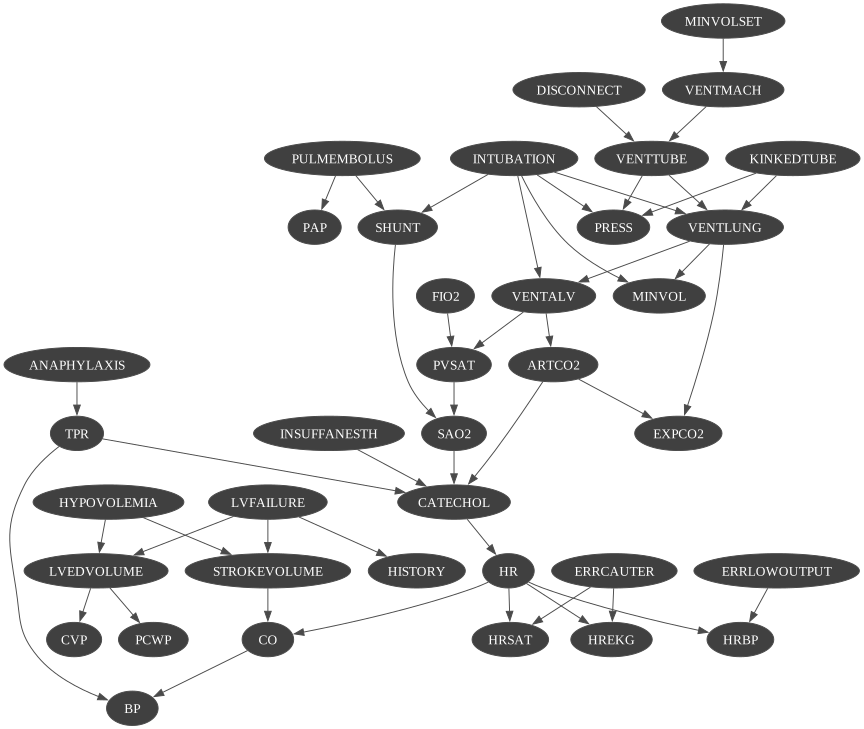
print(bn)BN{nodes: 37, arcs: 46, domainSize: 10^16.2389, dim: 509, mem: 5Ko 896o}From there, it is easy to get a posterior using an inference engine :
ie = gum.LazyPropagation(bn)ie.makeInference()print(ie.posterior(bn.idFromName("CATECHOL"))) CATECHOL │NORMAL │HIGH │─────────│─────────│ 0.0512 │ 0.9488 │But since we are in notebook, why not use pyAgrum notebook’s methods ?
gnb.showPosterior(bn, evs={}, target="CATECHOL")
You may also want to see the graph with some posteriors
## due to matplotlib, format is forced to png.gnb.showInference(bn, evs={}, targets={"VENTALV", "CATECHOL", "HR", "MINVOLSET"}, size="11")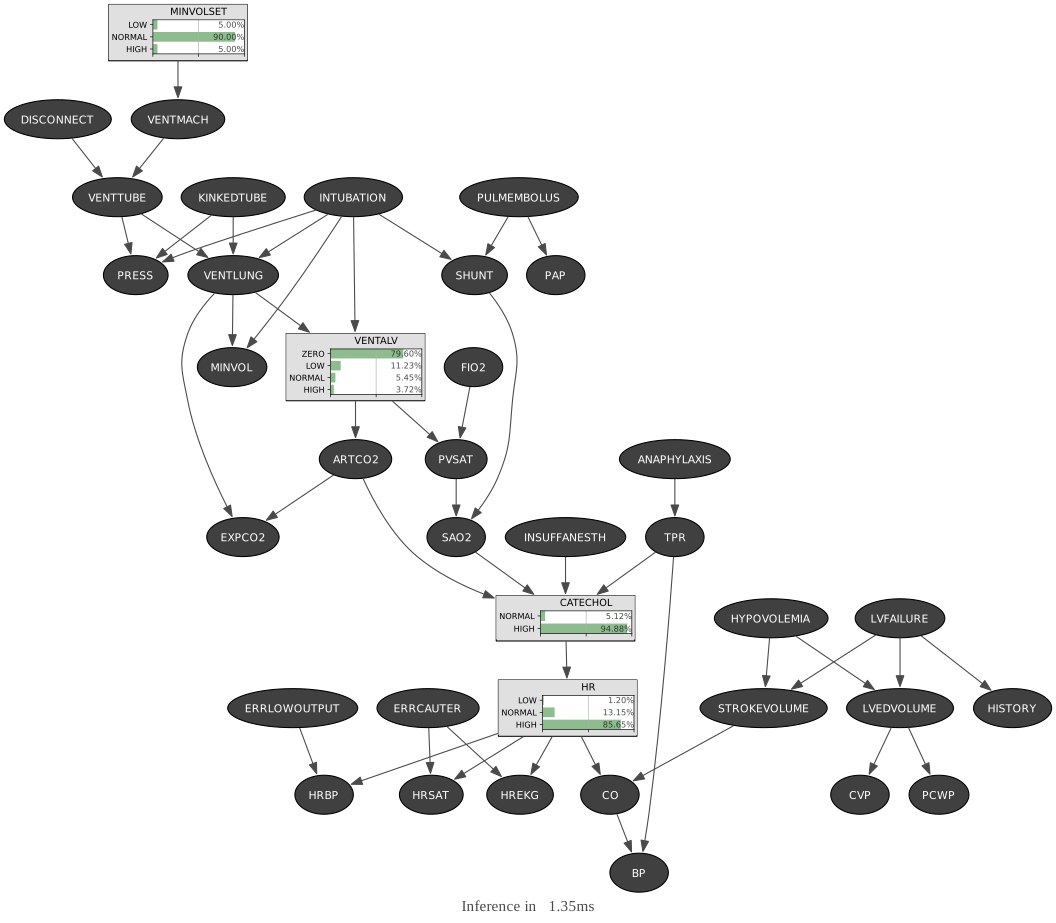
.. and then observe the impact of evidence :
gnb.showInference( bn, evs={"CO": 1, "VENTLUNG": 1}, targets={ "VENTALV", "CATECHOL", "HR", "MINVOLSET", "ANAPHYLAXIS", "STROKEVOLUME", "ERRLOWOUTPUT", "HBR", "PULMEMBOLUS", "HISTORY", "BP", "PRESS", "CO", }, size="10",)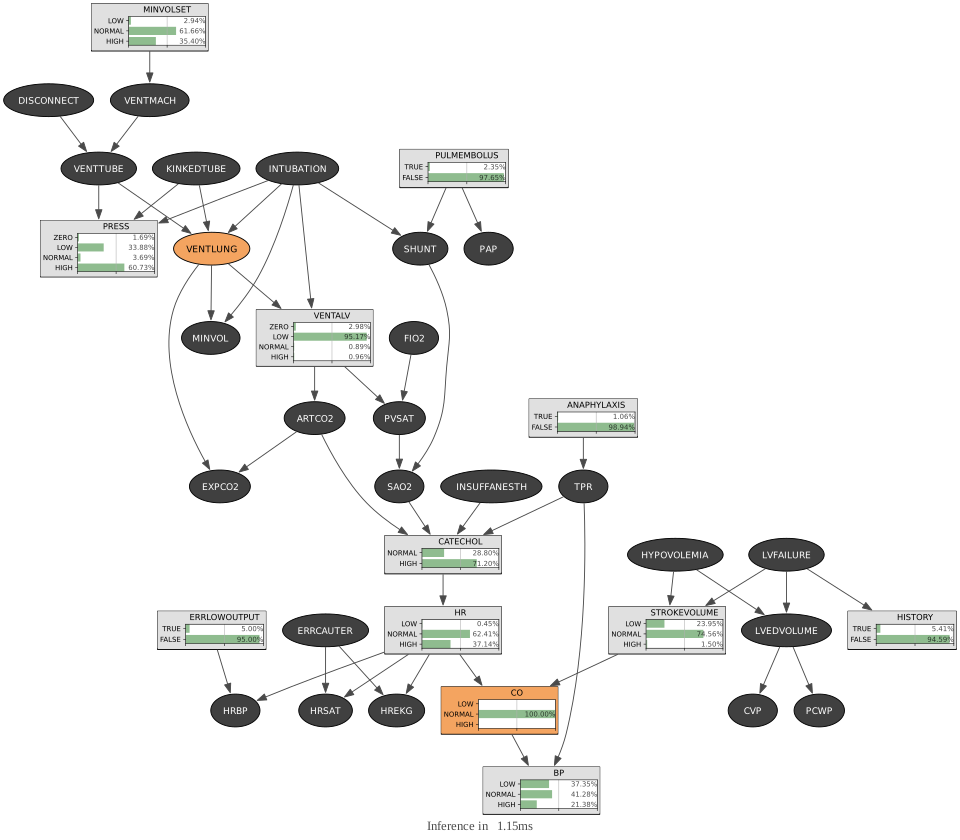
You can even compute all posteriors by leaving the targets parameter empty (which is its default value).
gnb.showInference(bn, evs={"CO": 1, "VENTLUNG": 1}, size="14")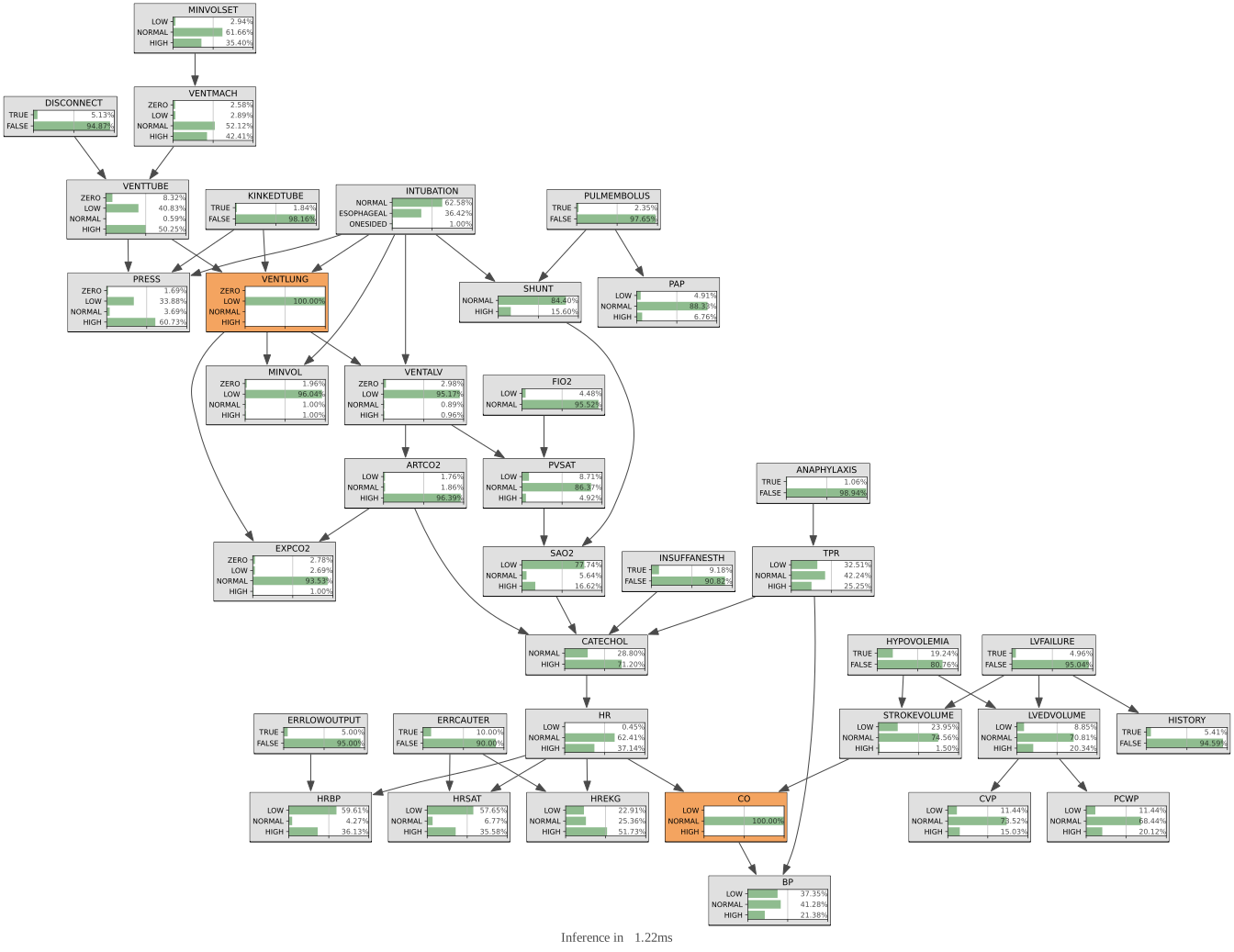
Showing the information graph
Section titled “Showing the information graph”To have a global view of the knowledge brought by the inference, you can also draw the entropy of all nodes
import pyagrum.explain as explain
explain.showInformation(bn, {}, size="14")
… and then observe the impact of an evidence on the whole bayes network :
explain.showInformation(bn, {"CO": 0}, size="9")
Exploring the junction tree
Section titled “Exploring the junction tree”Lazy Propagation, like several other inference algorithms, uses a junction tree to propagate information.
You can show the junction tree used by Lazy Propagation with pyAgrum:
jt = ie.junctionTree()gnb.showJunctionTree(bn, size="12")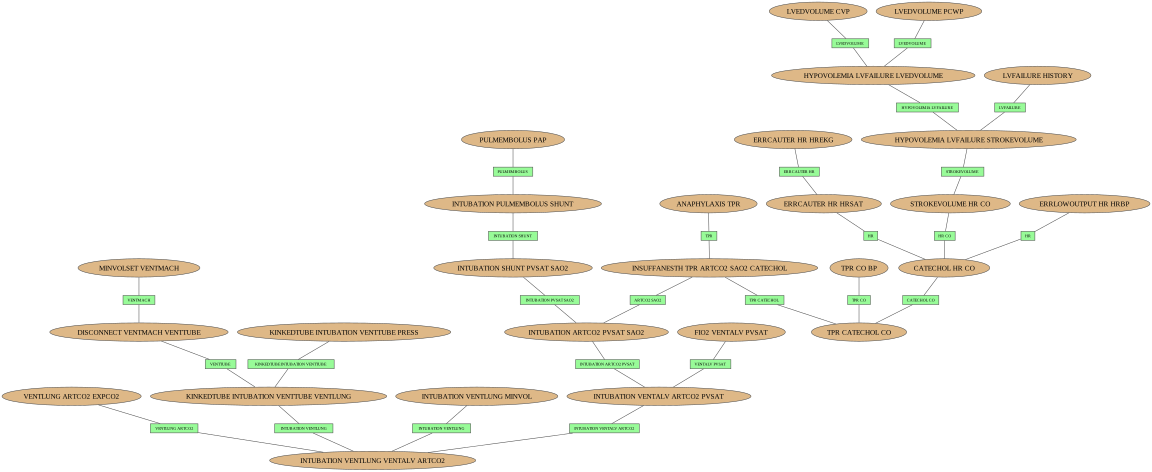
## another representation of the junction, more convenient for investigating the flow of data in the jt## the size/width of cliques and separators are proportionnal to the number of nodes in the factor.jt.map()Introspection in junction trees
Section titled “Introspection in junction trees”One can easily walk through the junction tree.
for n in jt.nodes(): print([bn.variable(n).name() for n in jt.clique(n)])['CVP', 'LVEDVOLUME']['FIO2', 'VENTALV', 'PVSAT']['ARTCO2', 'EXPCO2', 'VENTLUNG']['VENTMACH', 'MINVOLSET']['VENTMACH', 'DISCONNECT', 'VENTTUBE']['PRESS', 'KINKEDTUBE', 'INTUBATION', 'VENTTUBE']['ANAPHYLAXIS', 'TPR']['HRBP', 'ERRLOWOUTPUT', 'HR']['LVFAILURE', 'HISTORY']['HREKG', 'HR', 'ERRCAUTER']['PCWP', 'LVEDVOLUME']['PAP', 'PULMEMBOLUS']['SHUNT', 'INTUBATION', 'PULMEMBOLUS']['HRSAT', 'HR', 'ERRCAUTER']['LVFAILURE', 'HYPOVOLEMIA', 'LVEDVOLUME']['HYPOVOLEMIA', 'STROKEVOLUME', 'LVFAILURE']['CO', 'BP', 'TPR']['INTUBATION', 'VENTLUNG', 'MINVOL']['KINKEDTUBE', 'INTUBATION', 'VENTTUBE', 'VENTLUNG']['INSUFFANESTH', 'TPR', 'ARTCO2', 'SAO2', 'CATECHOL']['CO', 'STROKEVOLUME', 'HR']['CO', 'CATECHOL', 'HR']['CO', 'TPR', 'CATECHOL']['INTUBATION', 'SHUNT', 'PVSAT', 'SAO2']['INTUBATION', 'ARTCO2', 'PVSAT', 'SAO2']['ARTCO2', 'VENTALV', 'INTUBATION', 'PVSAT']['VENTALV', 'INTUBATION', 'ARTCO2', 'VENTLUNG']for e in jt.edges(): print(f"Separator for {e} : {jt.clique(e[0]).intersection(jt.clique(e[1]))}")Separator for (13, 30) : {18, 2}Separator for (2, 33) : {26, 22}Separator for (3, 4) : {16}Separator for (26, 27) : {34, 30}Separator for (7, 26) : {31}Separator for (12, 13) : {4}Separator for (31, 32) : {27, 26, 2}Separator for (23, 31) : {26, 28}Separator for (5, 22) : {0, 2, 20}Separator for (17, 24) : {13}Separator for (19, 27) : {34, 14}Separator for (24, 26) : {34, 31}Separator for (32, 33) : {25, 2, 26}Separator for (6, 23) : {14}Separator for (23, 27) : {14, 30}Separator for (11, 16) : {15}Separator for (10, 14) : {7, 31}Separator for (8, 17) : {9}Separator for (0, 16) : {15}Separator for (1, 32) : {25, 27}Separator for (20, 33) : {2, 22}Separator for (4, 22) : {20}Separator for (14, 26) : {31}Separator for (22, 33) : {2, 22}Separator for (30, 31) : {2, 27, 28}Separator for (16, 17) : {1, 9}jt.hasRunningIntersection()TrueIntrospecting junction trees and friends
Section titled “Introspecting junction trees and friends”The junction tree created by a LazyPropagation is optimized for the query (see RelevanceReasonning notebook). But you can also introspect a junction tree directly from a BN or a graph using the JunctionTreeGenerator’s class.
bn = gum.fastBN("0->1->2<-3->4->5->6<-2->7")jtg = gum.JunctionTreeGenerator()gnb.sideBySide( bn, jtg.junctionTree(bn), jtg.eliminationOrder(bn), jtg.binaryJoinTree(bn), captions=[ "A Bayesien network", "a junction tree for this BN", "its elimination order", "an (optimized) binary join tree", ],)junction tree from graphs (using uniform domainSize)
Section titled “junction tree from graphs (using uniform domainSize)”## creating a dag slightly differentdag = bn.dag()dag.addArc(0, 3)dag.addArc(0, 7)gnb.sideBySide( dag, dag.moralGraph(), jtg.junctionTree(dag), jtg.eliminationOrder(dag), jtg.binaryJoinTree(dag), captions=[ "A DAG", "its moral graph", "a junction tree for this dag (with partial order)", "its elimination order (with partial order)", "an (optipmized) binary jointree (with partial order)", ],)## creating an undigraph slightly differentug = bn.dag().moralGraph()ug.addEdge(0, 7)gnb.sideBySide( ug, jtg.junctionTree(ug), jtg.eliminationOrder(ug), jtg.binaryJoinTree(ug), captions=[ "A undigraph", "a junction tree for this undigraph", "its elimination order", "an (optipmized) binary jointree", ],)Using partial order to specify the elimination order
Section titled “Using partial order to specify the elimination order”## adding a partial order for the elimination orderpo = [[1, 2, 3], [0, 4, 7], [5, 6]]gnb.sideBySide( bn, jtg.junctionTree(bn, po), jtg.eliminationOrder(bn, po), jtg.binaryJoinTree(bn), captions=[ "A Bayesien network", "a junction tree for this BN using partial order", "its elimination order following partial order", "an (optimized) binary join tree", ],)## adding a partial order for the elimination order also for the graphspo = [[0, 4, 7], [1, 3], [5, 6, 2]]
## creating a dag slightly differentdag = bn.dag()dag.addArc(0, 3)dag.addArc(0, 7)
gnb.sideBySide( dag, dag.moralGraph(), jtg.junctionTree(dag, po), jtg.eliminationOrder(dag, po), jtg.binaryJoinTree(dag, po), captions=[ "A DAG", "its moral graph", "a junction tree for this dag (with partial order)", "its elimination order (with partial order)", "an (optimized) binary jointree (with partial order)", ],)