Learning classifiers
![]() | ![]() |
import pyagrum.skbn as skbnimport pyagrum.lib.notebook as gnbskbn is a pyAgrum’s module that allows to use bayesian networks as classifier in the scikit-learn environment.
Initialization of parameters
Section titled “Initialization of parameters”First, we initialize the parameters to indicate properties we want our classifier to have.
BNTest = skbn.createBNClassifier( learningMethod="Chow-Liu", prior="Smoothing", priorWeight=0.5, discretizationStrategy="quantile", usePR=True, significant_digit=13,)Then, we train the classifier thanks to two types of objects.
Learn from csv file
Section titled “Learn from csv file”BNTest.fitFromTabular(data="res/creditCardTest.csv", targetName="Class")BNClassifier(learningMethod='Chow-Liu', prior='Smoothing', priorWeight=0.5,significant_digit=13,type_processor=<pyagrum.lib.discreteTypeProcessor.DiscreteTypeProcessor object at 0x1129e8980>,usePR=True)</pre><b>In a Jupyter environment, please rerun this cell to show the HTML representation or trust the notebook. <br />On GitHub, the HTML representation is unable to render, please try loading this page with nbviewer.org.</b></div><div class="sk-container" hidden><div class="sk-item"><div class="sk-estimator fitted sk-toggleable"><input class="sk-toggleable__control sk-hidden--visually sk-global" id="sk-estimator-id-1" type="checkbox" checked><label for="sk-estimator-id-1" class="sk-toggleable__label fitted sk-toggleable__label-arrow"><div><div>BNClassifier</div></div><div><span class="sk-estimator-doc-link fitted">i<span>Fitted</span></span></div></label><div class="sk-toggleable__content fitted" data-param-prefix="">Parameters
</tbody></table></details></div>Fitted attributes
type_processor <pyagrum.lib....t 0x1129e8980> learningMethod 'Chow-Liu' prior 'Smoothing' priorWeight 0.5 usePR True significant_digit 13 scoringType 'BIC' constraints None possibleSkeleton None DirichletCsv None beta 1 </tr></tr></tr></tr></tr></tr></tr></tr></tr></tr></tr></tr></tbody></table></details></div></div></div></div></div></div><script>/* Authors: The scikit-learn developersSPDX-License-Identifier: BSD-3-Clause */
function copyToClipboard(text, element) { // Get the parameter prefix from the closest toggleable content const toggleableContent = element.closest(‘.sk-toggleable__content’); const paramPrefix = toggleableContent ? toggleableContent.dataset.paramPrefix : ”; const fullParamName = paramPrefix ?
${paramPrefix}${text}: text;const originalStyle = element.style;const computedStyle = window.getComputedStyle(element);const originalWidth = computedStyle.width;const originalHTML = element.innerHTML.replace('Copied!', '');navigator.clipboard.writeText(fullParamName).then(() => {element.style.width = originalWidth;element.style.color = 'green';element.innerHTML = "Copied!";setTimeout(() => {element.innerHTML = originalHTML;element.style = originalStyle;}, 2000);}).catch(err => {console.error('Failed to copy:', err);element.style.color = 'red';element.innerHTML = "Failed!";setTimeout(() => {element.innerHTML = originalHTML;element.style = originalStyle;}, 2000);});return false;}
document.querySelectorAll(‘.copy-paste-icon’).forEach(function(element) { const toggleableContent = element.closest(‘.sk-toggleable__content’); const paramPrefix = toggleableContent ? toggleableContent.dataset.paramPrefix : ”;
const parent = element.parentElement;if (!parent || !parent.nextElementSibling) {console.warn('Expected copy-paste icon is missing from the DOM structure');return;}const paramName = element.parentElement.nextElementSibling.textContent.trim().split(' ')[0];const fullParamName = paramPrefix ? `${paramPrefix}${paramName}` : paramName;element.setAttribute('title', fullParamName);});
/**
Copy the list of feature names formatted as a Python list.
@param {HTMLElement} element - The copy button inside a
.featuresblock; its siblingscontain a
detailselement and a table containing feature named.@returns {boolean} Always returns
falseso callers can prevent the default click behavior. */ function copyFeatureNamesToClipboard(element) { var detailsElem = element.closest(‘.features’).querySelector(‘details’); var wasOpen = detailsElem.open; detailsElem.open = true; var content = element.closest(‘.features’).querySelector(‘tbody’) .innerText.trim(); if (!wasOpen) detailsElem.open = false; const rows = content.split(‘\n’).map(row =>"${row}"); const formattedText =[\n${rows.join(',\n')},\n]; const originalHTML = element.innerHTML.replace(’✔’, ”); const originalStyle = element.style; const copyMark = document.createElement(‘span’); copyMark.innerHTML = ’✔’; copyMark.style.color = ‘blue’; copyMark.style.fontSize = ‘1em’;navigator.clipboard.writeText(formattedText) .then(() => { element.style.display = ‘none’; element.parentElement.appendChild(copyMark);
setTimeout(() => {copyMark.remove();element.innerHTML = originalHTML;element.style = originalStyle;}, 1000);}).catch(err => {console.error('Failed to copy:', err);element.style.color = 'orange';element.innerHTML = "Failed!";setTimeout(() => {element.innerHTML = originalHTML;element.style = originalStyle;}, 1000);});return false; } /**
Adapted from Skrub
@returns “light” or “dark” */ function detectTheme(element) { const body = document.querySelector(‘body’);
// Check VSCode theme const themeKindAttr = body.getAttribute(‘data-vscode-theme-kind’); const themeNameAttr = body.getAttribute(‘data-vscode-theme-name’);
if (themeKindAttr && themeNameAttr) { const themeKind = themeKindAttr.toLowerCase(); const themeName = themeNameAttr.toLowerCase();
if (themeKind.includes("dark") || themeName.includes("dark")) {return "dark";}if (themeKind.includes("light") || themeName.includes("light")) {return "light";}}
// Check Jupyter theme if (body.getAttribute(‘data-jp-theme-light’) === ‘false’) { return ‘dark’; } else if (body.getAttribute(‘data-jp-theme-light’) === ‘true’) { return ‘light’; }
// Guess based on a parent element’s color const color = window.getComputedStyle(element.parentNode, null).getPropertyValue(‘color’); const match = color.match(/^rgb\s*(\s*(\d+)\s*,\s*(\d+)\s*,\s*(\d+)\s*)\s*$/i); if (match) { const [r, g, b] = [ parseFloat(match[1]), parseFloat(match[2]), parseFloat(match[3]) ];
// <https://en.wikipedia.org/wiki/HSL_and_HSV#Lightness>const luma = 0.299 * r + 0.587 * g + 0.114 * b;if (luma > 180) {// If the text is very bright we have a dark themereturn 'dark';}if (luma < 75) {// If the text is very dark we have a light themereturn 'light';}// Otherwise fall back to the next heuristic.}
// Fallback to system preference return window.matchMedia(‘(prefers-color-scheme: dark)‘).matches ? ‘dark’ : ‘light’; }
function forceTheme(elementId) { const estimatorElement = document.querySelector(
#${elementId}); if (estimatorElement === null) { console.error(Element with id ${elementId} not found.); } else { const theme = detectTheme(estimatorElement); estimatorElement.classList.add(theme); } }forceTheme(‘sk-container-id-1’);
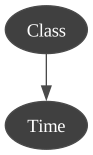
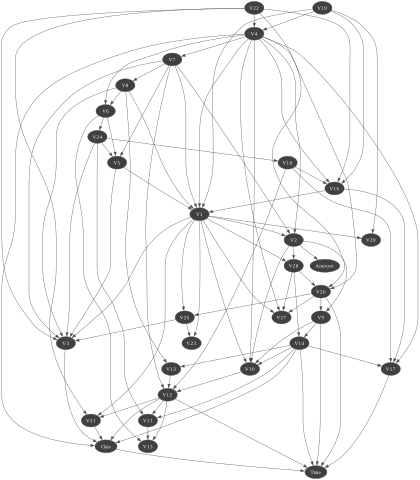
for i in BNTest.bn_.nodes():print(BNTest.bn_.variable(i))Class:Labelized({0.0|1.0})Time:Discretized(<(0;1578[,[1578;3733[,[3733;6982[,[6982;11033[,[11033;170348)>)V1:Discretized(<(-30.55238004;-1.332949264[,[-1.332949264;-0.654664391[,[-0.654664391;0.30537512[,[0.30537512;1.183457866[,[1.183457866;2.132386021)>)V2:Discretized(<(-25.64052693;-0.362407881[,[-0.362407881;0.104021894[,[0.104021894;0.582468095[,[0.582468095;1.126264537[,[1.126264537;22.05772899)>)V3:Discretized(<(-31.10368482;0.107723002[,[0.107723002;0.675277319[,[0.675277319;1.145250512[,[1.145250512;1.731063013[,[1.731063013;4.101716178)>)V4:Discretized(<(-4.657545034;-0.8356831[,[-0.8356831;0.033423475[,[0.033423475;0.648385592[,[0.648385592;1.445625927[,[1.445625927;12.11467184)>)V5:Discretized(<(-22.10553152;-0.8136663[,[-0.8136663;-0.355922897[,[-0.355922897;0.03294682[,[0.03294682;0.534604692[,[0.534604692;11.97426887)>)V6:Discretized(<(-7.574798166;-0.789777644[,[-0.789777644;-0.370597233[,[-0.370597233;0.035355351[,[0.035355351;0.711815449[,[0.711815449;10.03392286)>)V7:Discretized(<(-43.55724157;-0.691953395[,[-0.691953395;-0.264737855[,[-0.264737855;0.111993062[,[0.111993062;0.576160082[,[0.576160082;12.21924885)>)V8:Discretized(<(-41.04426092;-0.248777743[,[-0.248777743;-0.061897336[,[-0.061897336;0.101158949[,[0.101158949;0.417327159[,[0.417327159;20.00720837)>)V9:Discretized(<(-13.43406632;-0.258885741[,[-0.258885741;0.43278337[,[0.43278337;1.003150701[,[1.003150701;1.606746899[,[1.606746899;10.39288882)>)V10:Discretized(<(-24.58826244;-0.887241636[,[-0.887241636;-0.486914228[,[-0.486914228;-0.174270174[,[-0.174270174;0.281998033[,[0.281998033;12.25994935)>)V11:Discretized(<(-2.595325047;-0.216850152[,[-0.216850152;0.467606404[,[0.467606404;1.069280983[,[1.069280983;1.894362474[,[1.894362474;12.01891318)>)V12:Discretized(<(-18.68371463;-2.603364421[,[-2.603364421;-1.98917204[,[-1.98917204;-1.010277351[,[-1.010277351;0.297745303[,[0.297745303;3.774837253)>)V13:Discretized(<(-3.389510119;-0.277525814[,[-0.277525814;0.487335344[,[0.487335344;1.191999923[,[1.191999923;1.871678101[,[1.871678101;4.465413177)>)V14:Discretized(<(-19.21432549;-0.198436291[,[-0.198436291;0.394380416[,[0.394380416;1.129212699[,[1.129212699;1.560400117[,[1.560400117;5.7487338)>)V15:Discretized(<(-4.498944677;-0.89821835[,[-0.89821835;-0.252119146[,[-0.252119146;0.228108992[,[0.228108992;0.673845558[,[0.673845558;2.533660621)>)V16:Discretized(<(-14.12985452;-0.73752994[,[-0.73752994;-0.191439365[,[-0.191439365;0.226074322[,[0.226074322;0.649708023[,[0.649708023;3.930881236)>)V17:Discretized(<(-25.16279937;-0.373269972[,[-0.373269972;0.063135741[,[0.063135741;0.445363418[,[0.445363418;0.906547825[,[0.906547825;7.893392532)>)V18:Discretized(<(-9.498745921;-0.642528115[,[-0.642528115;-0.1793428[,[-0.1793428;0.166270273[,[0.166270273;0.556347095[,[0.556347095;4.115559919)>)V19:Discretized(<(-4.932733055;-0.673232673[,[-0.673232673;-0.228782999[,[-0.228782999;0.150300643[,[0.150300643;0.636971987[,[0.636971987;5.22834179)>)V20:Discretized(<(-13.27603434;-0.183661648[,[-0.183661648;-0.067770251[,[-0.067770251;0.044433337[,[0.044433337;0.232763125[,[0.232763125;11.05900429)>)V21:Discretized(<(-22.79760391;-0.298193493[,[-0.298193493;-0.179496901[,[-0.179496901;-0.054862175[,[-0.054862175;0.105119219[,[0.105119219;27.20283916)>)V22:Discretized(<(-8.887017141;-0.649013527[,[-0.649013527;-0.291807777[,[-0.291807777;0.009627985[,[0.009627985;0.351257859[,[0.351257859;8.361985192)>)V23:Discretized(<(-19.25432762;-0.215264519[,[-0.215264519;-0.092460674[,[-0.092460674;-1.53e-05[,[-1.53e-05;0.122578904[,[0.122578904;13.87622086)>)V24:Discretized(<(-2.51237651;-0.441546648[,[-0.441546648;-0.013724876[,[-0.013724876;0.248363887[,[0.248363887;0.468668566[,[0.468668566;3.200201195)>)V25:Discretized(<(-4.781605522;-0.238381673[,[-0.238381673;0.02446896[,[0.02446896;0.212093775[,[0.212093775;0.411607181[,[0.411607181;5.525092704)>)V26:Discretized(<(-1.338556498;-0.390763459[,[-0.390763459;-0.124995177[,[-0.124995177;0.128836809[,[0.128836809;0.664810252[,[0.664810252;3.517345612)>)V27:Discretized(<(-7.976099818;-0.097082439[,[-0.097082439;-0.025569225[,[-0.025569225;0.034724233[,[0.034724233;0.216123366[,[0.216123366;4.173387153)>)V28:Discretized(<(-3.054084903;-0.043029565[,[-0.043029565;0.006334972[,[0.006334972;0.029936485[,[0.029936485;0.111331248[,[0.111331248;4.860769069)>)Amount:Discretized(<(0;2.78[,[2.78;11.66[,[11.66;25.52[,[25.52;73.5[,[73.5;4002.88)>)gnb.sideBySide(BNTest.bn_, gnb.getInference(BNTest.bn_, size="15!"))
Name Type Value MarkovBlanket_ BayesNet (pyagrum.Baye...: 9, mem: 96o} bn_ BayesNet (pyagrum.Baye...mem: 5Ko 776o} classes_ ndarray[float64](2,) [0.,1.] feature_names_in_ ndarray[object](30,) ['Time','V1','V2',...,'V27','V28','Amount'] fromModel_ bool False label_ str '1.0' learner_ BNLearner (pyagrum.BNLe... : 0.500000 n_features_in_ int 30 targetType_ Float64DType dtype('float64') target_ str 'Class' threshold_ float64 0.121 variableNameIndexDictionary_ dict {'Amount': 29, 'Time': 0, 'V1': 1, 'V10': 10, ...} gnb.showBN(BNTest.MarkovBlanket_)
Learn from array-likes
Section titled “Learn from array-likes”We use a method to transform the csv file in two array-likes in order to train from the same database.
## we use now another method to learn the BN (MIIC)BNTest = skbn.createBNClassifier(learningMethod="MIIC",prior="Smoothing",priorWeight=0.5,discretizationStrategy="quantile",usePR=True,significant_digit=13,)xTrain, yTrain = BNTest.XYfromCSV(filename="res/creditCardTest.csv", target="Class")BNTest.fit(xTrain, yTrain)BNClassifier(prior='Smoothing', priorWeight=0.5, significant_digit=13,type_processor=<pyagrum.lib.discreteTypeProcessor.DiscreteTypeProcessor object at 0x112c022c0>,usePR=True)</pre><b>In a Jupyter environment, please rerun this cell to show the HTML representation or trust the notebook. <br />On GitHub, the HTML representation is unable to render, please try loading this page with nbviewer.org.</b></div><div class="sk-container" hidden><div class="sk-item"><div class="sk-estimator fitted sk-toggleable"><input class="sk-toggleable__control sk-hidden--visually sk-global" id="sk-estimator-id-2" type="checkbox" checked><label for="sk-estimator-id-2" class="sk-toggleable__label fitted sk-toggleable__label-arrow"><div><div>BNClassifier</div></div><div><span class="sk-estimator-doc-link fitted">i<span>Fitted</span></span></div></label><div class="sk-toggleable__content fitted" data-param-prefix="">Parameters
</tbody></table></details></div>Fitted attributes
type_processor <pyagrum.lib....t 0x112c022c0> prior 'Smoothing' priorWeight 0.5 usePR True significant_digit 13 learningMethod 'MIIC' scoringType 'BIC' constraints None possibleSkeleton None DirichletCsv None beta 1 </tr></tr></tr></tr></tr></tr></tr></tr></tr></tr></tr></tr></tbody></table></details></div></div></div></div></div></div><script>/* Authors: The scikit-learn developersSPDX-License-Identifier: BSD-3-Clause */
function copyToClipboard(text, element) { // Get the parameter prefix from the closest toggleable content const toggleableContent = element.closest(‘.sk-toggleable__content’); const paramPrefix = toggleableContent ? toggleableContent.dataset.paramPrefix : ”; const fullParamName = paramPrefix ?
${paramPrefix}${text}: text;const originalStyle = element.style;const computedStyle = window.getComputedStyle(element);const originalWidth = computedStyle.width;const originalHTML = element.innerHTML.replace('Copied!', '');navigator.clipboard.writeText(fullParamName).then(() => {element.style.width = originalWidth;element.style.color = 'green';element.innerHTML = "Copied!";setTimeout(() => {element.innerHTML = originalHTML;element.style = originalStyle;}, 2000);}).catch(err => {console.error('Failed to copy:', err);element.style.color = 'red';element.innerHTML = "Failed!";setTimeout(() => {element.innerHTML = originalHTML;element.style = originalStyle;}, 2000);});return false;}
document.querySelectorAll(‘.copy-paste-icon’).forEach(function(element) { const toggleableContent = element.closest(‘.sk-toggleable__content’); const paramPrefix = toggleableContent ? toggleableContent.dataset.paramPrefix : ”;
const parent = element.parentElement;if (!parent || !parent.nextElementSibling) {console.warn('Expected copy-paste icon is missing from the DOM structure');return;}const paramName = element.parentElement.nextElementSibling.textContent.trim().split(' ')[0];const fullParamName = paramPrefix ? `${paramPrefix}${paramName}` : paramName;element.setAttribute('title', fullParamName);});
/**
Copy the list of feature names formatted as a Python list.
@param {HTMLElement} element - The copy button inside a
.featuresblock; its siblingscontain a
detailselement and a table containing feature named.@returns {boolean} Always returns
falseso callers can prevent the default click behavior. */ function copyFeatureNamesToClipboard(element) { var detailsElem = element.closest(‘.features’).querySelector(‘details’); var wasOpen = detailsElem.open; detailsElem.open = true; var content = element.closest(‘.features’).querySelector(‘tbody’) .innerText.trim(); if (!wasOpen) detailsElem.open = false; const rows = content.split(‘\n’).map(row =>"${row}"); const formattedText =[\n${rows.join(',\n')},\n]; const originalHTML = element.innerHTML.replace(’✔’, ”); const originalStyle = element.style; const copyMark = document.createElement(‘span’); copyMark.innerHTML = ’✔’; copyMark.style.color = ‘blue’; copyMark.style.fontSize = ‘1em’;navigator.clipboard.writeText(formattedText) .then(() => { element.style.display = ‘none’; element.parentElement.appendChild(copyMark);
setTimeout(() => {copyMark.remove();element.innerHTML = originalHTML;element.style = originalStyle;}, 1000);}).catch(err => {console.error('Failed to copy:', err);element.style.color = 'orange';element.innerHTML = "Failed!";setTimeout(() => {element.innerHTML = originalHTML;element.style = originalStyle;}, 1000);});return false; } /**
Adapted from Skrub
@returns “light” or “dark” */ function detectTheme(element) { const body = document.querySelector(‘body’);
// Check VSCode theme const themeKindAttr = body.getAttribute(‘data-vscode-theme-kind’); const themeNameAttr = body.getAttribute(‘data-vscode-theme-name’);
if (themeKindAttr && themeNameAttr) { const themeKind = themeKindAttr.toLowerCase(); const themeName = themeNameAttr.toLowerCase();
if (themeKind.includes("dark") || themeName.includes("dark")) {return "dark";}if (themeKind.includes("light") || themeName.includes("light")) {return "light";}}
// Check Jupyter theme if (body.getAttribute(‘data-jp-theme-light’) === ‘false’) { return ‘dark’; } else if (body.getAttribute(‘data-jp-theme-light’) === ‘true’) { return ‘light’; }
// Guess based on a parent element’s color const color = window.getComputedStyle(element.parentNode, null).getPropertyValue(‘color’); const match = color.match(/^rgb\s*(\s*(\d+)\s*,\s*(\d+)\s*,\s*(\d+)\s*)\s*$/i); if (match) { const [r, g, b] = [ parseFloat(match[1]), parseFloat(match[2]), parseFloat(match[3]) ];
// <https://en.wikipedia.org/wiki/HSL_and_HSV#Lightness>const luma = 0.299 * r + 0.587 * g + 0.114 * b;if (luma > 180) {// If the text is very bright we have a dark themereturn 'dark';}if (luma < 75) {// If the text is very dark we have a light themereturn 'light';}// Otherwise fall back to the next heuristic.}
// Fallback to system preference return window.matchMedia(‘(prefers-color-scheme: dark)‘).matches ? ‘dark’ : ‘light’; }
function forceTheme(elementId) { const estimatorElement = document.querySelector(
#${elementId}); if (estimatorElement === null) { console.error(Element with id ${elementId} not found.); } else { const theme = detectTheme(estimatorElement); estimatorElement.classList.add(theme); } }forceTheme(‘sk-container-id-2’);
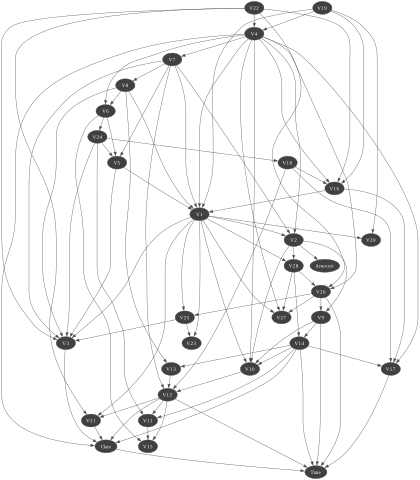
gnb.showBN(BNTest.bn_)
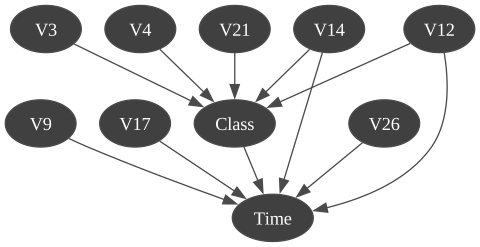
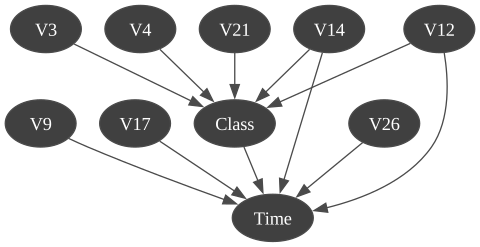
gnb.showBN(BNTest.MarkovBlanket_)
Create a classifier from a Bayesian network
Section titled “Create a classifier from a Bayesian network”If we already have a Bayesian network with learned parameters, we can create a classifier that uses it. In this case we do not have to train the classifier on data since it the Bayesian network is already trained.
ClassfromBN = skbn.createBNClassifier(significant_digit=7)ClassfromBN.fromTrainedModel(bn=BNTest.bn_,targetAttribute="Class",targetModality="1.0",threshold=BNTest.threshold_,variableList=xTrain.columns.tolist(),)gnb.showBN(ClassfromBN.bn_)
gnb.showBN(ClassfromBN.MarkovBlanket_)
Then, we work with functions from scikit-learn like score. We can also call it with a csv file or two array-likes.
xTest, yTest = ClassfromBN.XYfromCSV(filename="res/creditCardTest.csv", target="Class")Prediction for classifier
Section titled “Prediction for classifier”Prediction with csv file
Section titled “Prediction with csv file”scoreCSV1 = BNTest.score("res/creditCardTest.csv", y=yTest)print("{0:.2f}% good predictions".format(100 * scoreCSV1))99.77% good predictionsscoreCSV2 = ClassfromBN.score("res/creditCardTest.csv", y=yTest)print("{0:.2f}% good predictions".format(100 * scoreCSV2))99.77% good predictionsPrediction with array-like
Section titled “Prediction with array-like”scoreAR1 = BNTest.score(xTest, yTest)print("{0:.2f}% good predictions".format(100 * scoreAR1))99.77% good predictionsscoreAR2 = ClassfromBN.score(xTest, yTest)print("{0:.2f}% good predictions".format(100 * scoreAR2))99.77% good predictionsROC and Precision-Recall curves with all methods
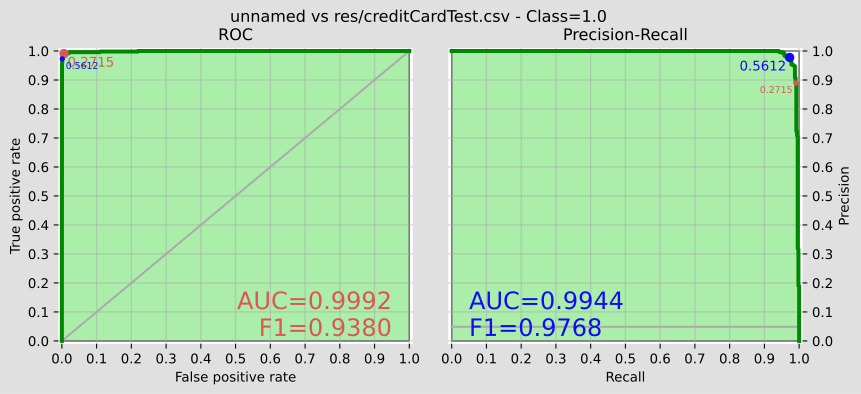
Section titled “ROC and Precision-Recall curves with all methods”In addition (and of course), we can work with functions from pyagrum (from
pyagrum.lib.bn2roc).BNTest.showROC_PR("res/creditCardTest.csv")
Name Type Value MarkovBlanket_ BayesNet (pyagrum.Baye...m: 293Ko 288o} bn_ BayesNet (pyagrum.Baye...Mo 117Ko 968o} classes_ ndarray[float64](2,) [0.,1.] feature_names_in_ ndarray[object](30,) ['Time','V1','V2',...,'V27','V28','Amount'] fromModel_ bool False label_ str '1.0' learner_ BNLearner (pyagrum.BNLe... : 0.500000 n_features_in_ int 30 targetType_ Float64DType dtype('float64') target_ str 'Class' threshold_ float64 0.5612 variableNameIndexDictionary_ dict {'Amount': 29, 'Time': 0, 'V1': 1, 'V10': 10, ...}