Discretization using pyAgrum's DiscreteTypeProcessor
 |  |  |
Most of the functionality of pyAgrum works only on discrete data. However data in the real world can be often continous. This class can be used to create dizcretized variables from continous data. Since this class was made for the purposes of the class BNClassifier, this class accepts data in the form of ndarrays. To transform data from a csv file to an ndarray we can use the function in BNClassifier XYfromCSV.
Creation of an instance and setting parameters
Section titled “Creation of an instance and setting parameters”To create an instance of this class we need to specify the default parameters (the discretization method and the number of bins) for discretizing data. We create a type_processor which uses the EWD (Equal Width Discretization) method with 5 bins. The threshold is used for determining if a variable is already discretized. In this case, if a variable has more than 10 unique values we treat it as continous. we can use the setDiscretizationParameters method to set the discretization parameters for a specific variable
%load_ext autoreload%autoreload 2
import pyagrum.skbn as skbnfrom pyagrum.lib.discreteTypeProcessor import DiscreteTypeProcessor
type_processor = DiscreteTypeProcessor(  defaultDiscretizationMethod="uniform", defaultNumberOfBins=5, discretizationThreshold=10)
Auditing data
Section titled “Auditing data”To see how certain data will be treated by the type_processor we can use the audit method.
import pandas
X = pandas.DataFrame.from_dict(  {    "var1": [1, 2, 3, 4, 5, 6, 7, 8, 9, 10, 11, 1, 2, 3],    "var2": ["a", "b", "c", "d", "e", "f", "g", "h", "i", "j", "k", "l", "m", "n"],    "var3": [1, 2, 5, 1, 2, 5, 1, 2, 5, 1, 2, 5, 1, 2],    "var4": [1.11, 2.213, 3.33, 4.23, 5.42, 6.6, 7.5, 8.9, 9.19, 10.11, 11.12, 12.21, 13.3, 14.5],    "var5": [1, 2, 3, 4, 5, 6, 7, 8, 9, 10, 11, 12, 13, 1],  })
print(X)
auditDict = type_processor.audit(X)
print()print("** audit **")for var in auditDict:  print(f"- {var} : ")  for k, v in auditDict[var].items():    print(f"    + {k} : {v}")
var1 var2 var3 var4 var50 1 a 1 1.110 11 2 b 2 2.213 22 3 c 5 3.330 33 4 d 1 4.230 44 5 e 2 5.420 55 6 f 5 6.600 66 7 g 1 7.500 77 8 h 2 8.900 88 9 i 5 9.190 99 10 j 1 10.110 1010 11 k 2 11.120 1111 1 l 5 12.210 1212 2 m 1 13.300 1313 3 n 2 14.500 1
** audit **- var1 : + method : uniform + nbBins : 5 + type : Continuous + minInData : 1 + maxInData : 11- var2 : + method : NoDiscretization + values : ['a' 'b' 'c' 'd' 'e' 'f' 'g' 'h' 'i' 'j' 'k' 'l' 'm' 'n'] + type : Discrete- var3 : + method : NoDiscretization + values : [1 2 5] + type : Discrete- var4 : + method : uniform + nbBins : 5 + type : Continuous + minInData : 1.11 + maxInData : 14.5- var5 : + method : uniform + nbBins : 5 + type : Continuous + minInData : 1 + maxInData : 13We can see that even though var1 has more unique values than var1, it is treated as a discrete variable. This is because the values of var2 are strings and therefore cannot be discretized.
Now we would like to discretized var1 using k-means, var4 using decille and we would like for var3 to stay not discretized but with all the value from 1 to 5…
type_processor = DiscreteTypeProcessor(  defaultDiscretizationMethod="uniform", defaultNumberOfBins=5, discretizationThreshold=10)
type_processor.setDiscretizationParameters("var1", "kmeans")type_processor.setDiscretizationParameters("var4", "quantile", 10)type_processor.setDiscretizationParameters(  "var3", "NoDiscretization", "[1,5]")  # same format for type as pyagrum.fastVar
auditDict = type_processor.audit(X)
print()print("** audit **")for var in auditDict:  print(f"- {var} : ")  for k, v in auditDict[var].items():    print(f"    + {k} : {v}")
** audit **- var1 : + method : kmeans + param : 5 + type : Continuous + minInData : 1 + maxInData : 11- var2 : + method : NoDiscretization + values : ['a' 'b' 'c' 'd' 'e' 'f' 'g' 'h' 'i' 'j' 'k' 'l' 'm' 'n'] + type : Discrete- var3 : + method : NoDiscretization + param : [1,5] + type : Discrete- var4 : + method : quantile + param : 10 + type : Continuous + minInData : 1.11 + maxInData : 14.5- var5 : + method : uniform + nbBins : 5 + type : Continuous + minInData : 1 + maxInData : 13Creating template BN from data
Section titled “Creating template BN from data”To create a template BN (and the variables) from data we can use the createVariable method for each column in our data matrix. This will use the parameters that we have already set to create discrete (or discretized) variables from our data.
template_bn = type_processor.discretizedTemplate(X)
print(template_bn)print(template_bn["var1"])print(template_bn["var2"])print(template_bn["var3"])print(template_bn["var4"])print(template_bn["var5"])
BN{nodes: 5, arcs: 0, domainSize: 17500, dim: 34, mem: 312o}var1:Discretized(<(1;2.625[,[2.625;5.125[,[5.125;7.5[,[7.5;9.5[,[9.5;11)>)var2:Labelized({a|b|c|d|e|f|g|h|i|j|k|l|m|n})var3:Range([1,5])var4:Discretized(<(1.11;2.213[,[2.213;3.33[,[3.33;5.42[,[5.42;6.6[,[6.6;8.2[,[8.2;9.19[,[9.19;10.11[,[10.11;12.21[,[12.21;13.3[,[13.3;14.5)>)var5:Discretized(<(1;3.4[,[3.4;5.8[,[5.8;8.2[,[8.2;10.6[,[10.6;13)>)For supervised discretization algorithms (MDLP and CAIM) the list of class labels for each datapoint is also needed.
y = [True, False, False, True, False, False, True, True, False, False, True, True, False, True]
type_processor.setDiscretizationParameters("var4", "CAIM")template_bn = type_processor.discretizedTemplate(X, y)print(template_bn["var4"])type_processor.setDiscretizationParameters("var4", "MDLP")template_bn = type_processor.discretizedTemplate(X, y)print(template_bn["var4"])var4:Discretized(<(1.11;10.614999999999998[,[10.614999999999998;14.5)>)var4:Discretized(<(1.11;1.6615000000000002[,[1.6615000000000002;14.5)>)The type_processor keeps track of the number of discretized variables created by it and the number of bins used to discretize them. To reset these two numbers to 0 we can use the clear method. We can also use it to clear the specific parameteres we have set for each variable.
print(f"numberOfContinuous : {type_processor.numberOfContinuous}")print(f"totalNumberOfBins : {type_processor.totalNumberOfBins}")
type_processor.clear()print("\n")
print(f"numberOfContinuous : {type_processor.numberOfContinuous}")print(f"totalNumberOfBins : {type_processor.totalNumberOfBins}")
type_processor.audit(X)
numberOfContinuous : 9totalNumberOfBins : 44
numberOfContinuous : 0totalNumberOfBins : 0
{'var1': {'method': 'kmeans', 'param': 5, 'type': 'Continuous', 'minInData': 1, 'maxInData': 11}, 'var2': {'method': 'NoDiscretization', 'type': 'Discrete'}, 'var3': {'method': 'NoDiscretization', 'param': '[1,5]', 'type': 'Discrete'}, 'var4': {'method': 'MDLP', 'param': 5, 'type': 'Continuous', 'minInData': 1.11, 'maxInData': 14.5}, 'var5': {'method': 'uniform', 'nbBins': 5, 'type': 'Continuous', 'minInData': 1, 'maxInData': 13}}type_processor.clear(True)type_processor.audit(X){'var1': {'method': 'uniform', 'nbBins': 5, 'type': 'Continuous', 'minInData': 1, 'maxInData': 11}, 'var2': {'method': 'NoDiscretization', 'values': array(['a', 'b', 'c', 'd', 'e', 'f', 'g', 'h', 'i', 'j', 'k', 'l', 'm', 'n'], dtype=object), 'type': 'Discrete'}, 'var3': {'method': 'NoDiscretization', 'values': array([1, 2, 5], dtype=object), 'type': 'Discrete'}, 'var4': {'method': 'uniform', 'nbBins': 5, 'type': 'Continuous', 'minInData': 1.11, 'maxInData': 14.5}, 'var5': {'method': 'uniform', 'nbBins': 5, 'type': 'Continuous', 'minInData': 1, 'maxInData': 13}}Using DiscreteTypeProcessor with BNClassifier
Section titled “Using DiscreteTypeProcessor with BNClassifier”import pyagrum as gumimport pyagrum.lib.notebook as gnb
import pandas as pd
X = pandas.DataFrame.from_dict( { "var1": [1, 2, 3, 4, 5, 6, 7, 8, 9, 10, 11, 1, 2, 3], "var2": ["a", "b", "c", "d", "e", "f", "g", "h", "i", "j", "k", "l", "m", "n"], "var3": [1, 2, 5, 1, 2, 5, 1, 2, 5, 1, 2, 5, 1, 2], "var4": [1.11, 2.213, 3.33, 4.23, 5.42, 6.6, 7.5, 8.9, 9.19, 10.11, 11.12, 12.21, 13.3, 14.5], "var5": [1, 2, 3, 4, 5, 6, 7, 8, 9, 10, 11, 12, 13, 1], })Y = [1, 0, 1, 0, 0, 0, 1, 1, 1, 0, 1, 1, 0, 0]
## Explicitly create and assign a type_processor before fit() to customize discretization per variabletype_processor = DiscreteTypeProcessor( defaultDiscretizationMethod="quantile", defaultNumberOfBins=5, discretizationThreshold=25)## by default number of bins is 5type_processor.setDiscretizationParameters("var1", "kmeans")# ... but 10 for var4type_processor.setDiscretizationParameters("var4", "quantile", 10)## in the database, var3 only takes values 1,2 or 5 but 3 and 4 are also possibletype_processor.setDiscretizationParameters("var3", "NoDiscretization", "[1, 5]")
classif = skbn.BNClassifier(type_processor=type_processor, learningMethod="TAN")
classif.fit(X, Y)
gnb.showInference(classif.bn_)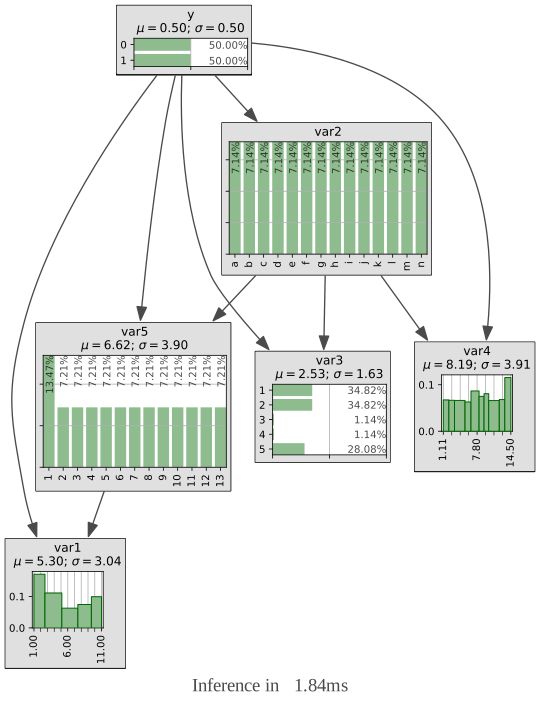
Using Discretizer with BNLearner
Section titled “Using Discretizer with BNLearner”import pyagrum.lib.notebook as gnb
import pyagrum.skbn as skbn
file_name = "res/discretizable.csv"data = pd.read_csv(file_name)
type_processor = DiscreteTypeProcessor( defaultDiscretizationMethod="quantile", defaultNumberOfBins=10, discretizationThreshold=25)## creating a template explaining the variables proposed by the type_processor. This variables will be used by the learnertemplate = type_processor.discretizedTemplate(data)learner = gum.BNLearner(file_name, template)learner.useMIIC()learner.useNMLCorrection()
bn = learner.learnBN()gnb.showInference(bn, size="10!")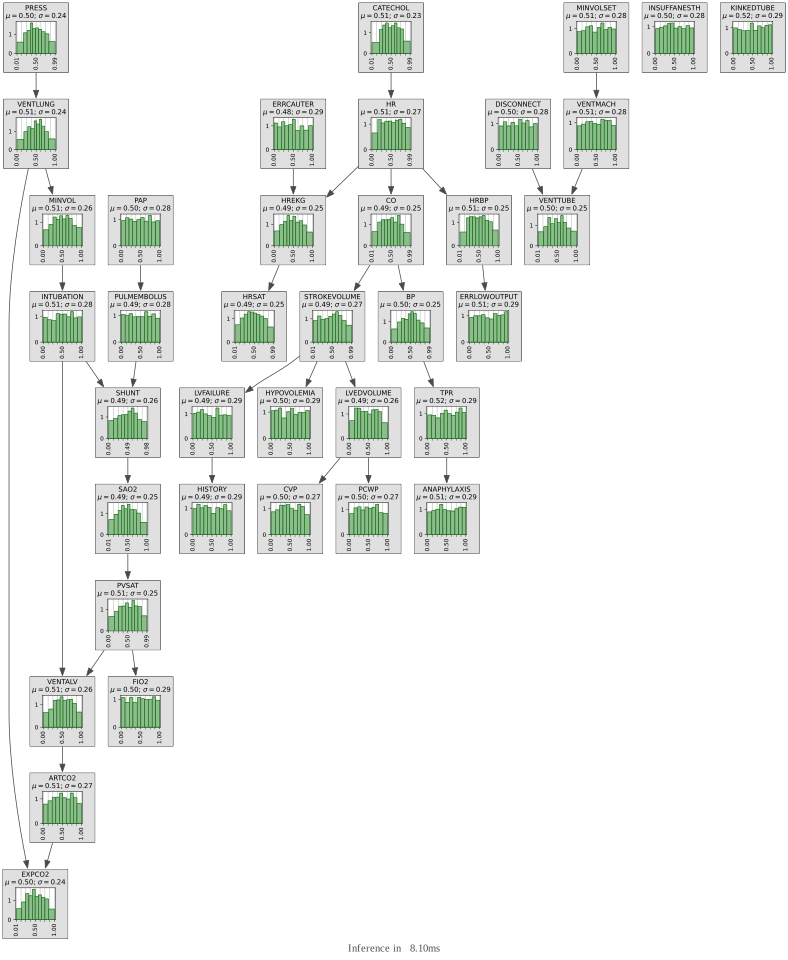
Comparing discretization methods
Section titled “Comparing discretization methods”Different discretization for the same mixture of 2 Gaussians.
import numpy as npimport pandas
N = 20000N1 = 2 * N // 3N2 = N - N1
classY = np.array([1] * N1 + [0] * N2)data = pandas.DataFrame(  data={    "y": classY,    # discretiation using quantile (15 bins)    "q15": np.concatenate((np.random.normal(0, 2, N1), np.random.normal(10, 2, N2))),    # discretiation using uniform (15 bins)    "u15": np.concatenate((np.random.normal(0, 2, N1), np.random.normal(10, 2, N2))),    # discretiation using kmeans (15 bins)    "k15": np.concatenate((np.random.normal(0, 2, N1), np.random.normal(10, 2, N2))),    # discretiation using quantile (5 bins)    "q5": np.concatenate((np.random.normal(0, 2, N1), np.random.normal(10, 2, N2))),    # discretiation using kmeans (5 bins)    "k5": np.concatenate((np.random.normal(0, 2, N1), np.random.normal(10, 2, N2))),    # other discretization methods    "caim": np.concatenate((np.random.normal(0, 2, N1), np.random.normal(10, 2, N2))),    "mdlp": np.concatenate((np.random.normal(0, 2, N1), np.random.normal(10, 2, N2))),    "expert": np.concatenate((np.random.normal(0, 2, N1), np.random.normal(10, 2, N2))),  })
type_processor = DiscreteTypeProcessor(  defaultDiscretizationMethod="quantile", defaultNumberOfBins=15, discretizationThreshold=10)
type_processor.setDiscretizationParameters("u15", method="uniform")type_processor.setDiscretizationParameters("k15", method="kmeans")type_processor.setDiscretizationParameters("q5", method="quantile", parameters=5)type_processor.setDiscretizationParameters("k5", method="kmeans", parameters=5)type_processor.setDiscretizationParameters("caim", method="CAIM", parameters=5)type_processor.setDiscretizationParameters("mdlp", method="MDLP", parameters=5)type_processor.setDiscretizationParameters("expert", method="expert", parameters=[-30.0, -2, 0.2, 1, 30.0])
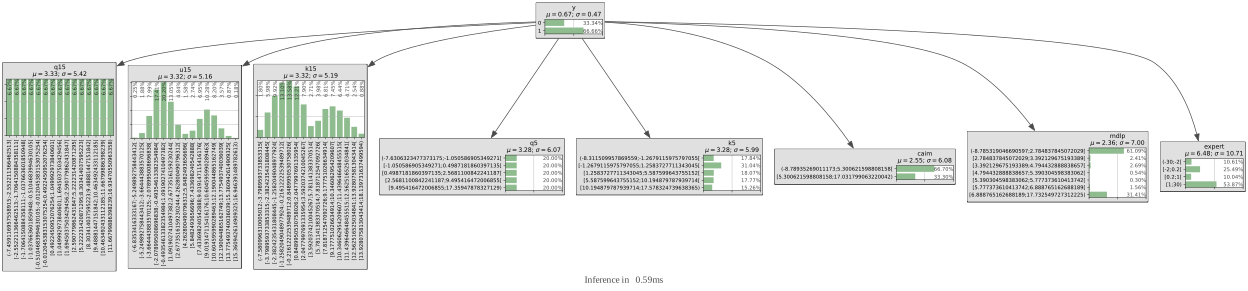
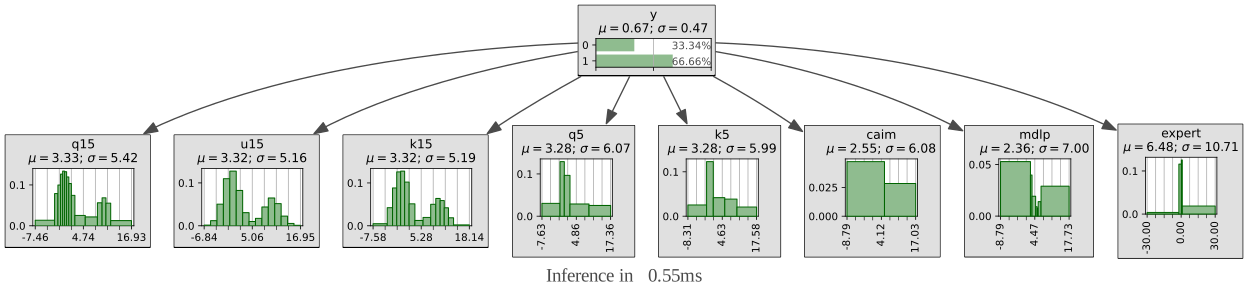
By default, the distributions for discretized variables are represented as “histogram”(the surface of the bars are proportionnal to the probabilities).
template = type_processor.discretizedTemplate(data, y=classY, possibleValuesY=[0, 1])for i, n in template: print(f"{n:7} : {template.variable(i)}")y : y:Range([0,1])q15 : q15:Discretized(<(-7.354138451664773;-2.5524278998099916[,[-2.5524278998099916;-1.6723060753537506[,[-1.6723060753537506;-1.0528084750625115[,[-1.0528084750625115;-0.5072856946248469[,[-0.5072856946248469;-0.006781480353300688[,[-0.006781480353300688;0.5023554954062578[,[0.5023554954062578;1.0451099141157447[,[1.0451099141157447;1.702643100205835[,[1.702643100205835;2.572018005236802[,[2.572018005236802;5.399289659031166[,[5.399289659031166;8.350770264965897[,[8.350770264965897;9.482224645904868[,[9.482224645904868;10.503186084222083[,[10.503186084222083;11.691195656795182[,[11.691195656795182;16.958806059976574)>)u15 : u15:Discretized(<(-7.526845142285428;-5.898635475265092[,[-5.898635475265092;-4.270425808244755[,[-4.270425808244755;-2.6422161412244183[,[-2.6422161412244183;-1.0140064742040824[,[-1.0140064742040824;0.6142031928162535[,[0.6142031928162535;2.242412859836591[,[2.242412859836591;3.870622526856927[,[3.870622526856927;5.498832193877263[,[5.498832193877263;7.127041860897599[,[7.127041860897599;8.755251527917935[,[8.755251527917935;10.38346119493827[,[10.38346119493827;12.01167086195861[,[12.01167086195861;13.639880528978946[,[13.639880528978946;15.268090195999282[,[15.268090195999282;16.896299863019618)>)k15 : k15:Discretized(<(-7.288125977243499;-3.651552386047256[,[-3.651552386047256;-2.2871575426770483[,[-2.2871575426770483;-1.205816185870983[,[-1.205816185870983;-0.1730038364830071[,[-0.1730038364830071;0.8793646418457975[,[0.8793646418457975;2.047790118433081[,[2.047790118433081;3.5540769993421915[,[3.5540769993421915;5.648873408787395[,[5.648873408787395;7.601699370724537[,[7.601699370724537;8.949885723629512[,[8.949885723629512;10.11428291613031[,[10.11428291613031;11.218859402463337[,[11.218859402463337;12.389188726917494[,[12.389188726917494;13.842354732212094[,[13.842354732212094;17.158552451571325)>)q5 : q5:Discretized(<(-9.197800063963678;-1.046921222471568[,[-1.046921222471568;0.5335749037717794[,[0.5335749037717794;2.5645448003986995[,[2.5645448003986995;9.5305825944536[,[9.5305825944536;16.984016109199473)>)k5 : k5:Discretized(<(-7.01076402193141;-1.046105922691508[,[-1.046105922691508;1.4253179493369421[,[1.4253179493369421;5.602139329107468[,[5.602139329107468;10.106730597771158[,[10.106730597771158;17.811955620904705)>)caim : caim:Discretized(<(-9.003592603513873;5.356685228290781[,[5.356685228290781;17.28760304632428)>)mdlp : mdlp:Discretized(<(-8.30369141454838;3.2354664329166885[,[3.2354664329166885;4.47113951371435[,[4.47113951371435;5.366173179215561[,[5.366173179215561;5.979134821341045[,[5.979134821341045;7.9910905390160885[,[7.9910905390160885;17.374174424873974)>)expert : expert:Discretized(<(-30;-2[,[-2;0.2[,[0.2;1[,[1;30)>)learner = gum.BNLearner(data, template)bn = gum.BayesNet(template)for i, n in bn: if n != "y": bn.addArc("y", n)bn## learner.useMIIC()## bn=learner.learnBN()learner.fitParameters(bn)
## dot | neato | fdp | sfdp | twopi | circo | osage | patchworkgum.config.push()gum.config["notebook", "graph_layout"] = "fdp"gnb.showInference(bn, size="8!")gum.config.pop()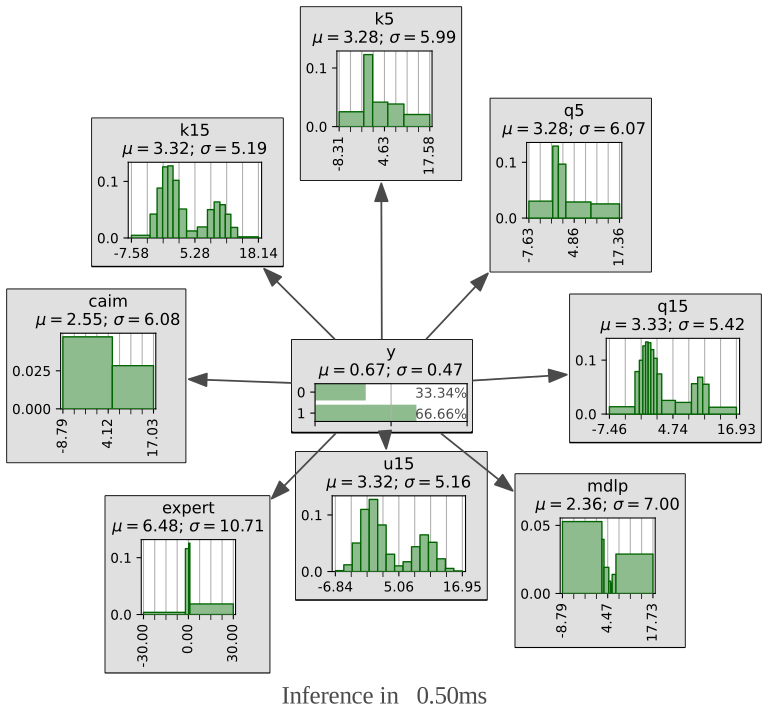
But you can always choose to show them as as “bar” (the height of the bars are proportionnal to the probabilities) instead of “histogram” (the area of the bars is proportionnal to the probabilites)
## changing how discretized variable are visualizedgum.config.push()gum.config["notebook", "histogram_discretized_visualisation"] = "bar"gnb.showInference(bn, size="13!")gum.config.pop() # default (above) is "histogram"gnb.showInference(bn, size="13!")