


Using Continuous-Time Bayesian Networks
 |  |  |
import pyagrum as gumimport pyagrum.lib.notebook as gnbimport pyagrum.ctbn as ctimport pyagrum.ctbn.notebook as ctbnnbA CTBN(Continuous-Time Bayesian Networks) is a graphical model that allows a Bayesian Network to evolve over continuous time.
(For more details see https://pyagrum.readthedocs.io/en/latest/ctbn.html)
Creating a CTBN
Section titled “Creating a CTBN”## 1. Creating the ctbnctbn = ct.CTBN()
## 2. Adding the random variablesctbn.add(gum.LabelizedVariable("cloudy?", "cloudy?"))ctbn.add(gum.LabelizedVariable("rain?", "rain?"))
## 3. Adding the arcsctbn.addArc("cloudy?", "rain?")ctbn.addArc("rain?", "cloudy?")
## 4. Filling the CIMS (Conditional Intensity Matrixes)ctbn.CIM("cloudy?")[{"rain?": "0"}] = [[-0.1, 0.1], [1, -1]]ctbn.CIM("cloudy?")[{"rain?": "1"}] = [[-100, 100], [0.5, -0.5]]
ctbn.CIM("rain?")[{"cloudy?": "0"}] = [[-0.5, 0.5], [1000, -1000]]ctbn.CIM("rain?")[{"cloudy?": "1"}] = [[-2, 2], [2, -2]]
## 5. Plotting the CTBN (whith/whithout the CIMs)ctbnnb.showCtbnGraph(ctbn)ctbnnb.showCIMs(ctbn)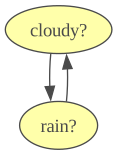
|
|
| ||
|---|---|---|---|
|
| -0.1000 | 0.1000 | |
| 1.0000 | -1.0000 | ||
|
| -100.0000 | 100.0000 | |
| 0.5000 | -0.5000 | ||
|
|
| ||
|---|---|---|---|
|
| -0.5000 | 0.5000 | |
| 1000.0000 | -1000.0000 | ||
|
| -2.0000 | 2.0000 | |
| 2.0000 | -2.0000 | ||
cloudy?#i gives the state cloudy? is currently in and cloudy?#j gives its next state.
The CIM object, built around a pyagrum.Tensor is used to store the parameters of the variables, describing the waiting time before
switching to another state.
A useful tool for CIMs, mainly used for simple inference, is amalgamation. It allows to merge many CIMs into one.
cimA = ctbn.CIM("cloudy?")cimB = ctbn.CIM("rain?")amal = cimA.amalgamate(cimB)  # or cimA * cimB
amal.getTensor() # as a Tensor|
|
| |||
|---|---|---|---|---|
|
|
| -0.6000 | 0.5000 | |
| 1.0000 | 0.0000 | |||
|
| 0.1000 | 0.0000 | ||
| -3.0000 | 2.0000 | |||
|
|
| 1000.0000 | -1100.0000 | |
| 0.0000 | 0.5000 | |||
|
| 0.0000 | 100.0000 | ||
| 2.0000 | -2.5000 | |||
print("\nJoint intensity matrix as numpy array\n")print(amal.toMatrix()) # as a numpy arrayJoint intensity matrix as numpy array
[[-6.0e-01 1.0e-01 5.0e-01 0.0e+00] [ 1.0e+00 -3.0e+00 0.0e+00 2.0e+00] [ 1.0e+03 0.0e+00 -1.1e+03 1.0e+02] [ 0.0e+00 2.0e+00 5.0e-01 -2.5e+00]]A random variable of a ctbn can be identified by either its name or id.
In any case, most class functions parameters allow for a variable to be identified by either its name or id (type NameOrId).
labels_with_id = ctbn.labels(0)labels_with_name = ctbn.labels("cloudy?")print(f"labels using id : {labels_with_id}, using name : {labels_with_name}")
variable_with_id = ctbn.variable(0)variable_with_name = ctbn.variable("cloudy?")print(f"The variables 0 and 'cloudy?' are the same ? {variable_with_id == variable_with_name}")
labels using id : ('0', '1'), using name : ('0', '1')The variables 0 and 'cloudy?' are the same ? TrueAll functions with NameOrId parameters work the same way
Random CTBN generator
Section titled “Random CTBN generator”The CtbnGenerator module can be used to quickly generate CTBNs. The parameters value are drawn at random from a value range. The diagonal coefficients are just the negative sum of the ones on the same line (in a CIM). It is also possible to choose the number of variables, the maximum number of parents a variable can have, and the domain size of the variables.
randomCtbn = ct.randomCTBN(valueRange=(1, 10), n=8, parMax=2, modal=2)
ctbnnb.showCtbnGraph(randomCtbn)ctbnnb.showCIMs(randomCtbn)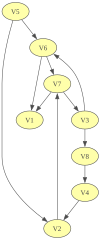
|
|
| ||
|---|---|---|---|
|
| -8.4782 | 8.4782 | |
| 4.4413 | -4.4413 | ||
|
| -8.4203 | 8.4203 | |
| 6.5616 | -6.5616 | ||
|
|
| ||
|---|---|---|---|
|
| -7.9314 | 7.9314 | |
| 1.4843 | -1.4843 | ||
|
| -2.3085 | 2.3085 | |
| 8.2893 | -8.2893 | ||
|
|
| |||
|---|---|---|---|---|
|
|
| -6.2883 | 6.2883 | |
| 6.8417 | -6.8417 | |||
|
| -3.0116 | 3.0116 | ||
| 3.9411 | -3.9411 | |||
|
|
| -3.7961 | 3.7961 | |
| 7.8485 | -7.8485 | |||
|
| -5.1926 | 5.1926 | ||
| 7.5284 | -7.5284 | |||
|
|
| |||
|---|---|---|---|---|
|
|
| -7.9536 | 7.9536 | |
| 2.5604 | -2.5604 | |||
|
| -8.2743 | 8.2743 | ||
| 7.4910 | -7.4910 | |||
|
|
| -8.0556 | 8.0556 | |
| 1.5243 | -1.5243 | |||
|
| -5.8630 | 5.8630 | ||
| 6.9802 | -6.9802 | |||
|
|
| |||
|---|---|---|---|---|
|
|
| -1.6273 | 1.6273 | |
| 2.8999 | -2.8999 | |||
|
| -6.4331 | 6.4331 | ||
| 2.1968 | -2.1968 | |||
|
|
| -7.3615 | 7.3615 | |
| 9.2726 | -9.2726 | |||
|
| -4.9940 | 4.9940 | ||
| 3.8950 | -3.8950 | |||
|
|
| |
|---|---|---|
| -9.9808 | 9.9808 | |
| 1.7603 | -1.7603 | |
|
|
| |||
|---|---|---|---|---|
|
|
| -8.8078 | 8.8078 | |
| 1.3926 | -1.3926 | |||
|
| -9.7843 | 9.7843 | ||
| 3.8571 | -3.8571 | |||
|
|
| -1.4083 | 1.4083 | |
| 3.1319 | -3.1319 | |||
|
| -3.1706 | 3.1706 | ||
| 4.1775 | -4.1775 | |||
|
|
| |
|---|---|---|
| -8.5177 | 8.5177 | |
| 6.3389 | -6.3389 | |
Inference with CTBNs
Section titled “Inference with CTBNs”Exact inference & Forward Sampling inference
Section titled “Exact inference & Forward Sampling inference”-
Amalgamation is used to compute exact inference. It consists in merging all the CIMs of a CTBN into one CIM. Then we use the properties of markov process : for enough time to notice convergence.
-
Forward sampling works this way:
- At time :
- Draw a “time until next change” value for each variable’s exponential distribution of their waiting time.
- Select the variable with smallest transition time : .
- Draw the variable next state uniformly.
- loop until .
When doing forward sampling, we first iterate this process over a given amount of iterations (called burnIn). We consider the last values as the initial configuration for sampling. The reason is that the initial state of a CTBN is unknown without real data.
## 1. Initialiaze Inference objectie = ct.SimpleInference(ctbn)ie_forward = ct.ForwardSamplingInference(ctbn)gnb.sideBySide(ctbnnb.getCtbnGraph(ctbn), ctbnnb.getCtbnInference(ctbn, ie), ctbnnb.getCtbnInference(ctbn, ie_forward))In any case, inference can be made using makeInference() function from every Inference object.
import time
## Simple inferencetime1 = time.time()ie.makeInference(t=5000)pot1 = ie.posterior("cloudy?")elapsed1 = time.time() - time1
## Sampling inferencetime2 = time.time()ie_forward.makeInference(timeHorizon=5000, burnIn=100)pot2 = ie_forward.posterior("cloudy?")elapsed2 = time.time() - time2
gnb.sideBySide( gnb.getTensor(pot1), gnb.getTensor(pot2), captions=[f"Simple inference {round(elapsed1 * 1000, 2)} ms", f"Sampling inference {round(elapsed2 * 1000, 2)} ms"],)Plotting a sample
Section titled “Plotting a sample”Here is an example of a trajectory plot
## 1_1. Find trajectory stored in the inference classie_forward.makeInference()traj = ie_forward.trajectory  # a single trajectory list[tuple[float, str, str]]
## 1_2. Or find it in a csv fileie_forward.writeTrajectoryCSV("out/trajectory.csv", n=1, timeHorizon=1000, burnIn=100)  # to save a trajectorytraj = ct.readTrajectoryCSV("out/trajectory.csv")  # a dict of trajectories
## 2. Plot the trajectoryct.plotTrajectory(ctbn.variable("cloudy?"), traj[0], timeHorizon=40, plotname="plot of cloudy?")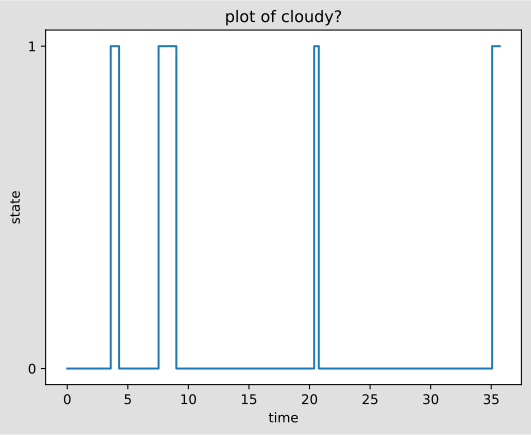
It is also possible to plot the proportions of the states a variable is in over time.
Let’s take the exemple of a variable with domain size=5.
## 1. Create CTBNnew_ctbn = ct.CTBN()X = gum.LabelizedVariable("X", "X", ["a1", "a2", "a3", "a4", "a5"])new_ctbn.add(X)new_ctbn.CIM("X")[:] = [  [-10, 2, 4, 0, 4],  [0.5, -1, 0.5, 0, 0],  [5, 0.5, -10, 3.5, 1],  [50, 0.5, 50, -200.5, 100],  [1, 0, 2, 7, -10],]## 2. SamplingieX = ct.ForwardSamplingInference(new_ctbn)ieX.writeTrajectoryCSV("out/traj_quinary.csv", n=3, timeHorizon=100)trajX = ct.readTrajectoryCSV("out/traj_quinary.csv")
## 3. Plottingct.plotFollowVar(X, trajX)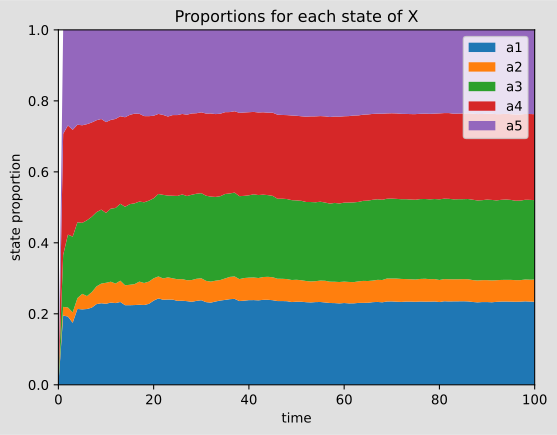
CTBN Learning with pyAgrum
Section titled “CTBN Learning with pyAgrum”The ctbn library has tools to learn the graph of a CTBN as well as the CIMs of its variables
Learning the variables
Section titled “Learning the variables”From a sample, we can find the variables name and their labels. However, if the sample is too short, it is possible that some information may be missed.
newCtbn = ct.CTBNFromData(traj)
print("variables found and their labels")for name in newCtbn.names():  print(f"variable {name}, labels : {newCtbn.labels(name)}")
variables found and their labelsvariable rain?, labels : ('0', '1')variable cloudy?, labels : ('0', '1')Learning the structure of the CTBN
Section titled “Learning the structure of the CTBN”## 1. Create a Learner.learner = ct.Learner("out/trajectory.csv")
## 2. Run learning algorithmlearned_ctbn = learner.learnCTBN()
## 3. Plot the learned CTBNgnb.show(learned_ctbn)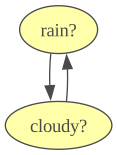
Let’s note that having a test object is necessary since we want to be able to test independency between variables. For now only 2 tests are available : (Fisher and Chi2) test and Oracle test. Oracle test is only used for benchmarking since it uses the initial ctbn as a reference.
Fitting parameters
Section titled “Fitting parameters”It is also possible to approximate the transition time distributions of each variable, i.e the CIMs.
Note that conditioning variables are taken from the ctbn.
cims_before = ctbnnb.getCIMs(ctbn)learner.fitParameters(ctbn)cims_after = ctbnnb.getCIMs(ctbn)
gnb.sideBySide(cims_before, cims_after, captions=["original CIMs", "learned CIMs"])Example from [Nodelman et al, 2003]
Section titled “Example from [Nodelman et al, 2003]”This example comes from :
U. Nodelman, C.R. Shelton, and D. Koller (2003). "Learning Continuous Time Bayesian Networks." Proc. Nineteenth Conference on Uncertainty in Artificial Intelligence (UAI) (pp. 451-458).## 1. Creating the ctbndrugEffect = ct.CTBN()
drugEffect.add(gum.LabelizedVariable("Eating", ""))drugEffect.add(gum.LabelizedVariable("Hungry", ""))drugEffect.add(gum.LabelizedVariable("Full stomach", ""))drugEffect.add(gum.LabelizedVariable("Uptake", ""))drugEffect.add(gum.LabelizedVariable("Concentration", "?"))drugEffect.add(gum.LabelizedVariable("Barometer", ""))drugEffect.add(gum.LabelizedVariable("Joint pain", ""))drugEffect.add(gum.LabelizedVariable("Drowsy", ""))
drugEffect.addArc("Hungry", "Eating")drugEffect.addArc("Eating", "Full stomach")drugEffect.addArc("Full stomach", "Hungry")drugEffect.addArc("Full stomach", "Concentration")drugEffect.addArc("Uptake", "Concentration")drugEffect.addArc("Concentration", "Drowsy")drugEffect.addArc("Barometer", "Joint pain")drugEffect.addArc("Concentration", "Joint pain")
gnb.show(drugEffect)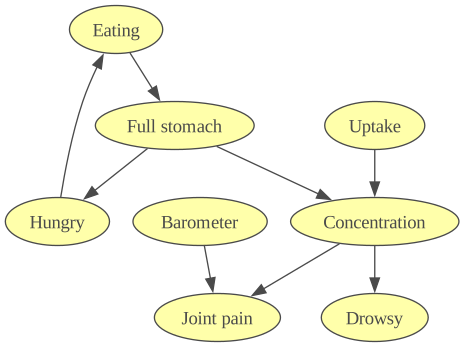
from pyagrum.ctbn.CTBNGenerator import randomCIMs
randomCIMs(drugEffect, (0.1, 10))drugEffect.CIM("Eating")[{"Hungry": 0}] = [[-0.1, 0.1], [10, -10]]drugEffect.CIM("Eating")[{"Hungry": 1}] = [[-2, 2], [0.1, -0.1]]drugEffect.CIM("Full stomach")[{"Eating": 0}] = [[-0.1, 0.1], [10, -10]]drugEffect.CIM("Full stomach")[{"Eating": 1}] = [[-2, 2], [0.1, -0.1]]drugEffect.CIM("Hungry")[{"Full stomach": 0}] = [[-0.1, 0.1], [10, -10]]drugEffect.CIM("Hungry")[{"Full stomach": 1}] = [[-2, 2], [0.1, -0.1]]
ieX = ct.ForwardSamplingInference(drugEffect)ieX.writeTrajectoryCSV("out/drugEffect.csv", n=3, timeHorizon=100)trajX = ct.readTrajectoryCSV("out/drugEffect.csv")
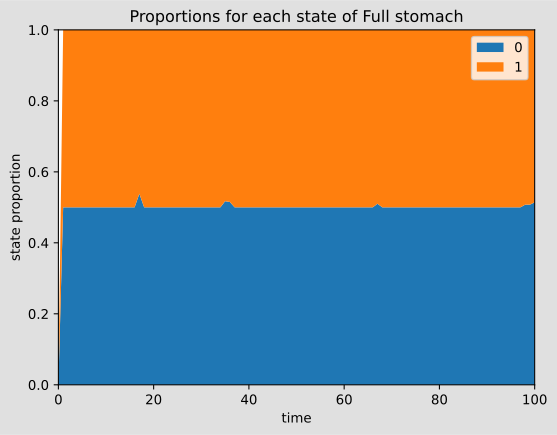
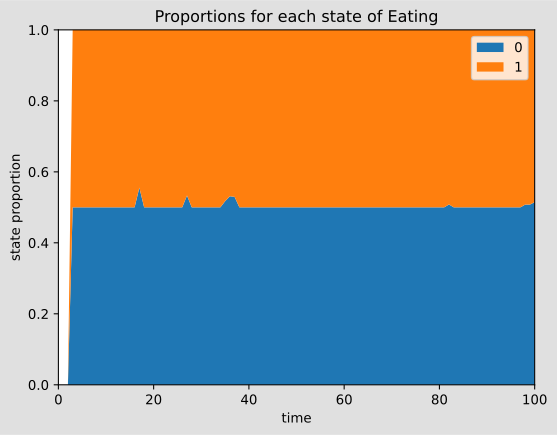
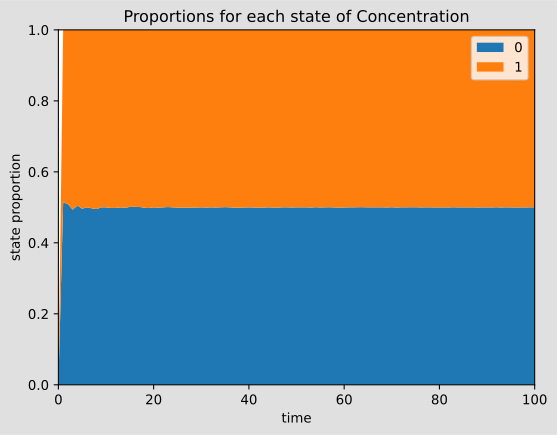
ct.plotFollowVar(drugEffect.variable("Hungry"), trajX)ct.plotFollowVar(drugEffect.variable("Full stomach"), trajX)ct.plotFollowVar(drugEffect.variable("Eating"), trajX)ct.plotFollowVar(drugEffect.variable("Concentration"), trajX)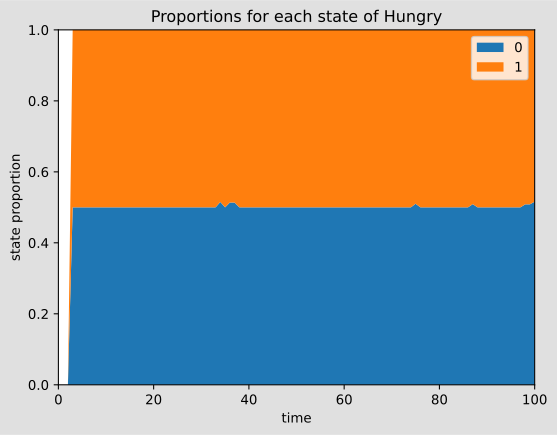
Input/output with pickle for CTBN
Section titled “Input/output with pickle for CTBN”import pickle
with open("out/testCTBN.pkl", "bw") as f: pickle.dump(drugEffect, f)drugEffectwith open("out/testCTBN.pkl", "br") as f: copyDrug = pickle.load(f)copyDrug